
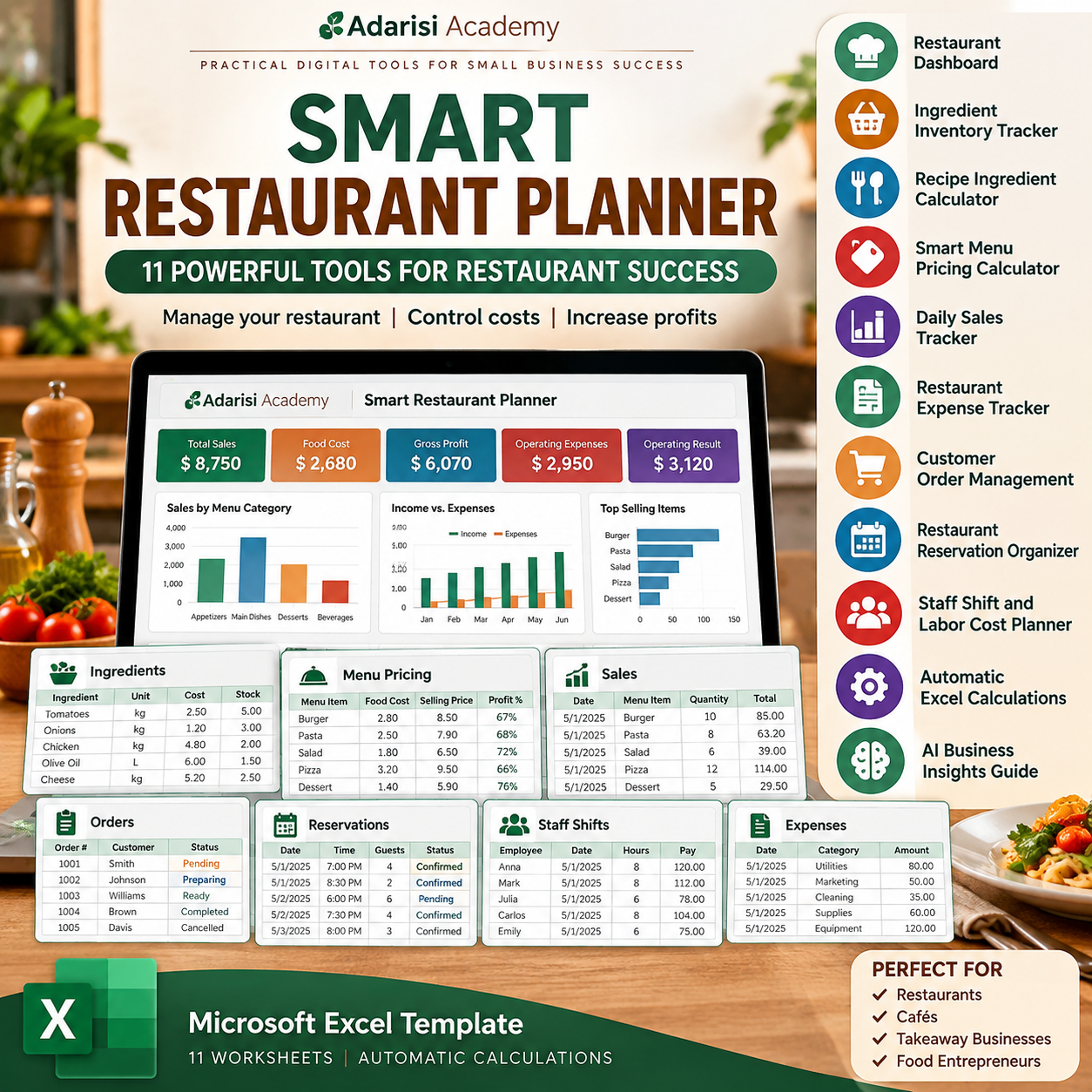
Smart Restaurant Planner – 11 Powerful Tools for Restaurant Success
$19.99
Manage your restaurant with confidence using the Smart Restaurant Planner by Adarisi Academy. This Excel business management template includes automatic food cost calculations, menu pricing, ingredient inventory, sales tracking, expenses, orders, reservations, staff shifts, a financial dashboard, and an AI insights guide. Designed for small restaurants, cafés, and food entrepreneurs.
🎓 70% DISCOUNT FOR ADARISI ACADEMY MEMBERSHIP
Membership: $9.99/month · Cancel anytime

Description
Smart Restaurant Planner – 11 Powerful Tools for Restaurant Success
Simplify restaurant management, understand your food costs, and make smarter business decisions.
Running a restaurant involves much more than preparing delicious food and providing excellent customer service. Restaurant owners must manage ingredient costs, menu prices, inventory, employee schedules, customer orders, operating expenses, and daily sales.
The Smart Restaurant Planner by Adarisi Academy brings essential business management tools together in one organized Microsoft Excel workbook.
Whether you operate a small restaurant, café, takeaway business, or independent food service establishment, this digital spreadsheet can help you organize your information and better understand your business performance.
Why Your Restaurant Needs a Smart Planning System
One of the biggest challenges in restaurant management is knowing how much each menu item actually costs to prepare.
Ingredient prices change, food waste affects profitability, and operating expenses can quickly reduce earnings.
Without reliable records, restaurant owners may struggle to identify which menu items are profitable and which areas need improvement.
The Smart Restaurant Planner provides a practical system for tracking important information, calculating estimated costs, and reviewing financial results.
Instead of depending entirely on manual calculations, you can use built-in Excel formulas to support your everyday decisions.
11 Powerful Restaurant Management Tools
1. Restaurant Dashboard
Review key business indicators in one place.
The dashboard summarizes recorded revenue, estimated food costs, gross profit, operating expenses, estimated staff labor, and operating results.
It also displays operational indicators such as recorded sales quantities, open orders, and ingredients requiring replenishment.
2. Ingredient Inventory Tracker
Organize your restaurant ingredients and monitor estimated stock levels.
Record purchase costs, package quantities, available inventory, and reorder levels.
The workbook estimates ingredient consumption using recorded sales and recipe quantities, helping you identify potential purchasing needs.
3. Recipe Ingredient Calculator
Understand the estimated ingredient cost of preparing individual menu items.
Enter ingredients and quantities used per portion, and the spreadsheet calculates the associated costs using your ingredient price information.
This feature helps you evaluate the financial impact of recipe changes.
4. Smart Menu Pricing Calculator
Determine whether your selling prices align with your target food cost percentage.
The menu pricing worksheet estimates suggested prices and calculates food cost percentages and gross profit per portion.
These calculations can support more informed menu pricing decisions.
5. Daily Sales Tracker
Record menu items sold, quantities, selling prices, and sales channels.
Automatic calculations estimate total revenue, ingredient costs, and gross profit for each recorded transaction.
6. Restaurant Expense Tracker
Keep operating expenses organized.
Record expenses such as utilities, marketing, cleaning supplies, and other business costs.
Maintaining accurate records helps you understand how expenses affect profitability.
7. Customer Order Management
Organize orders, quantities, due dates, and preparation statuses.
Track whether an order is pending, being prepared, ready, completed, or cancelled.
This worksheet is an internal planning tool and does not automatically receive online orders.
8. Restaurant Reservation Organizer
Maintain a convenient record of reservations.
Record dates, times, party sizes, tables, and reservation statuses.
The worksheet provides a manual reservation log, not an online booking service.
9. Staff Shift and Labor Cost Planner
Record employee shifts and hourly pay rates.
The spreadsheet estimates working hours and labor costs, helping you review staffing expenses alongside other business costs.
10. Automatic Financial Calculations
Reduce repetitive calculations with built-in Excel formulas.
The workbook automatically calculates supported recipe costs, menu pricing estimates, sales totals, inventory estimates, and dashboard metrics.
Financial results depend on the accuracy and completeness of the information you enter.
11. AI Business Insights Guide
Explore your restaurant’s performance with the included artificial intelligence analysis prompts.
You can use aggregated business information with ChatGPT to explore potential improvements in pricing, inventory management, promotional planning, and profitability.
Important: AI analysis is a manual workflow. The workbook does not connect automatically to ChatGPT or external AI services.
Who Is This Product For?
The Smart Restaurant Planner is designed for small restaurant owners and independent food entrepreneurs who want a practical business management resource.
It can be useful for restaurants, cafés, sandwich shops, takeaway businesses, small catering operations, and other food service businesses.
The workbook is particularly suitable for business owners who prefer working with spreadsheets rather than purchasing complex restaurant management software.
What Is Included in Your Download?
You will receive one Microsoft Excel workbook containing 11 organized worksheets:
- Start Here
- Ingredients
- Recipe Lines
- Menu Pricing
- Sales
- Expenses
- Orders
- Reservations
- Staff Shifts
- Dashboard
- AI Insights
The workbook includes sample information to demonstrate its features.
Replace the sample entries with your own business information before using the planner for actual operations.
How to Use Your Smart Restaurant Planner
Download the Excel file and begin with the instructions worksheet.
Enter your ingredients, purchase prices, and quantities. Next, add your menu items and recipe ingredients.
Once your recipes are configured, review the calculated food costs and pricing recommendations.
Record your restaurant’s sales, operating expenses, orders, reservations, and staff shifts as needed.
Finally, review the dashboard to understand your recorded business activity and identify opportunities for improvement.
For additional information about using Excel spreadsheets, visit the official Microsoft Excel website.
Important Information
This is a digital spreadsheet template, not standalone restaurant management software.
It does not include payment processing, point-of-sale integration, live reservation booking, payroll processing, tax filing, or automatic inventory synchronization.
Inventory and financial calculations are estimates based on entered data. Actual stock levels should be checked independently.
The workbook is intended for Microsoft Excel. Google Sheets compatibility has not yet been fully verified.
No physical product will be shipped.
Make Smarter Decisions for Your Restaurant
A successful restaurant needs more than great food. It also needs clear financial information, organized operations, and consistent business planning.
The Smart Restaurant Planner gives you a structured way to understand your food costs, evaluate menu prices, monitor business expenses, and organize everyday restaurant activities.
Download your Smart Restaurant Planner and start managing your restaurant with greater clarity and confidence.
Created by Adarisi Academy – Practical Digital Tools for Small Business Success.
 70% DISCOUNT FOR ADARISI ACADEMY MEMBERSHIP
Membership: $9.99/month · Cancel anytime
Vendor Information
- Store Name: ADARISI ACADEMY
- Vendor: ADARISI ACADEMY
- 5.00 rating from 3 reviews









Reviews
There are no reviews yet.